Chapters
- 1. Getting started
- 2. Adding items
- 3. Catalogue
- 4. Bookcases and plan view
- 5. Copies and loans
- 6. Editions and supplements
- 7. Circulation
- 8. Reports
- 9. Sign in with Microsoft
- 10. Reading
- 11. Genres
- 12. Libraries, roles, invitations
- 13. Settings
- 14. On your phone
- 15. Connect AI assistants
- 16. Regalzeile for Chrome
- 17. What's new
Reports
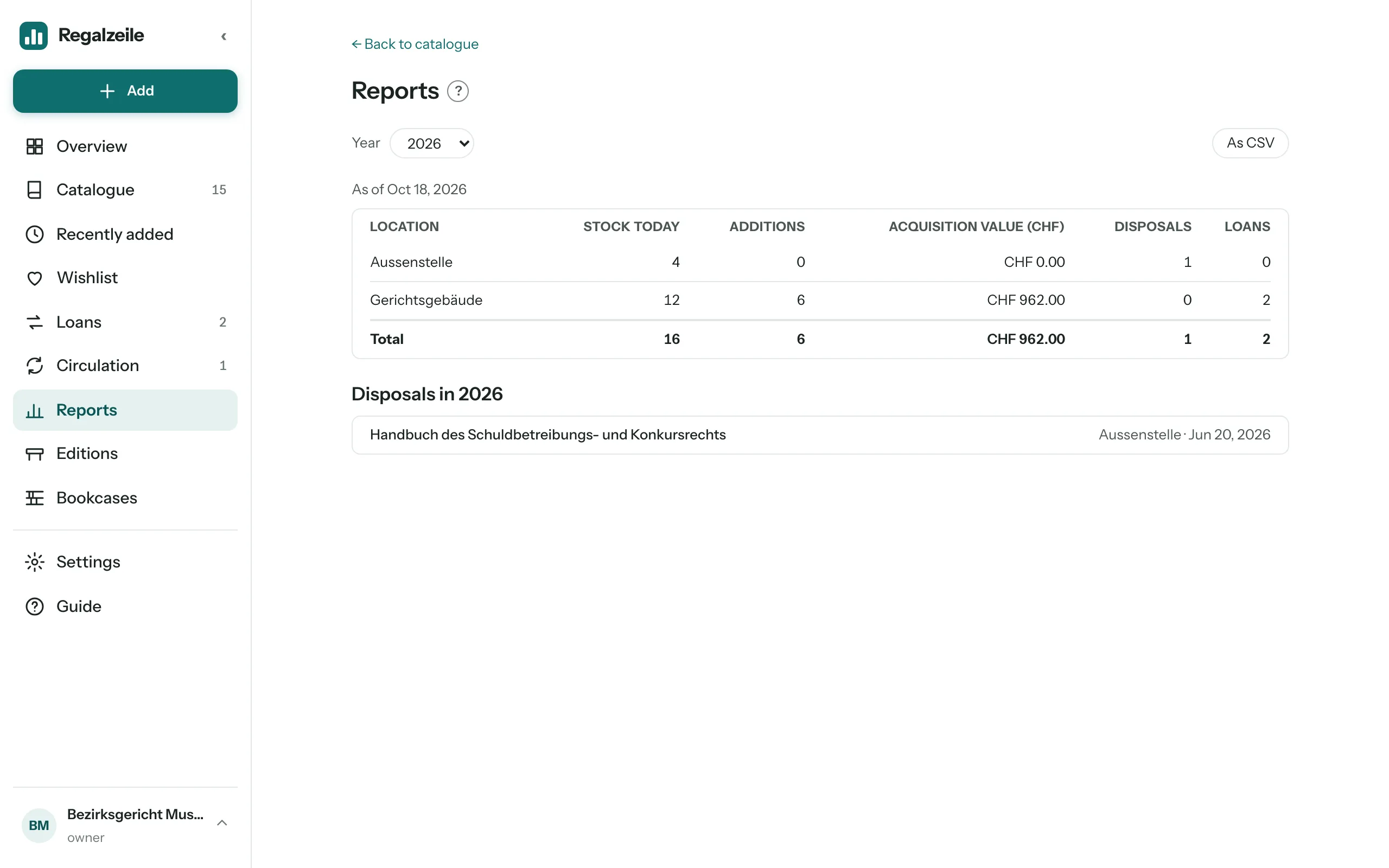
The “Reports” page counts, for one calendar year, what stands at each location, what came in and went out, and how often items were lent, for example for the annual report of a court library. Regalzeile calculates everything live from copies, loans and the disposal log; there is nothing to prepare. Reports are part of the offer for organisations.
Viewing a report
- Open the “Reports” menu entry; it comes after “Circulation”.
- Choose the “Year” at the top. The list runs from the oldest date in the library to the current year; the current year is preselected.
- Read the table: one row per building, by name, then “No location” and finally “Total”.
The columns
- Stock at year end (in the current year Stock today): the copies that were at the location on 31 December or today, that is, added by that day and not yet disposed of.
- Additions: the copies whose acquisition date falls in the chosen year.
- Acquisition value: the sum of the prices of these additions, in the library’s currency (the heading names it, for example “Acquisition value (CHF)”). Regalzeile does not convert anything. Additions without a price count as 0; below the table it then says “n additions without a price”.
- Disposals: the copies deleted in the chosen year.
- Loans: the loans that started in the chosen year, counted at the building where the copy stood when it was lent.
Location
The location is the building where a copy stands today. If it stands in a bookcase, the bookcase’s building applies, otherwise the copy’s “Building” field. Regalzeile keeps no location history: a copy that moved counts with all its years at the new location. Copies without a building appear in the “No location” row; it only shows when there is something to count. You add buildings under Bookcases and plan view.
Acquisition date
A copy’s acquisition date is its “Acquired on” field; if that is empty, the day the item was added applies. New copies get “Acquired on” prefilled with today’s date; you can change it in the form, for example for a book that has been on the shelf for a long time. More under Copies and loans.
Disposal log
When you delete a copy or a whole item, Regalzeile writes an entry in the disposal log for each copy: title, location, acquisition date, price, day of disposal and the copy’s loans per year. That way stock, acquisition value and loans of earlier years stay correct even though the copy is gone. Below the table, the section “Disposals in …” lists the disposals of the chosen year with title, location and date, newest first. Entries can be neither edited nor deleted.
As CSV
The “As CSV” button downloads a file with the columns standort, jahr, bestand, zugaenge, anschaffungswert, abgaenge and ausleihen: one row per building and year, all years at once, without total rows. “No location” has an empty standort. The acquisition value is a number with a point and two decimals, without currency.
With Claude
An AI assistant fetches a year’s report with the same figures using get_report.