Chapters
- 1. Getting started
- 2. Adding items
- 3. Catalogue
- 4. Bookcases and plan view
- 5. Copies and loans
- 6. Editions and supplements
- 7. Circulation
- 8. Reports
- 9. Sign in with Microsoft
- 10. Reading
- 11. Genres
- 12. Libraries, roles, invitations
- 13. Settings
- 14. On your phone
- 15. Connect AI assistants
- 16. Regalzeile for Chrome
- 17. What's new
Editions and supplements
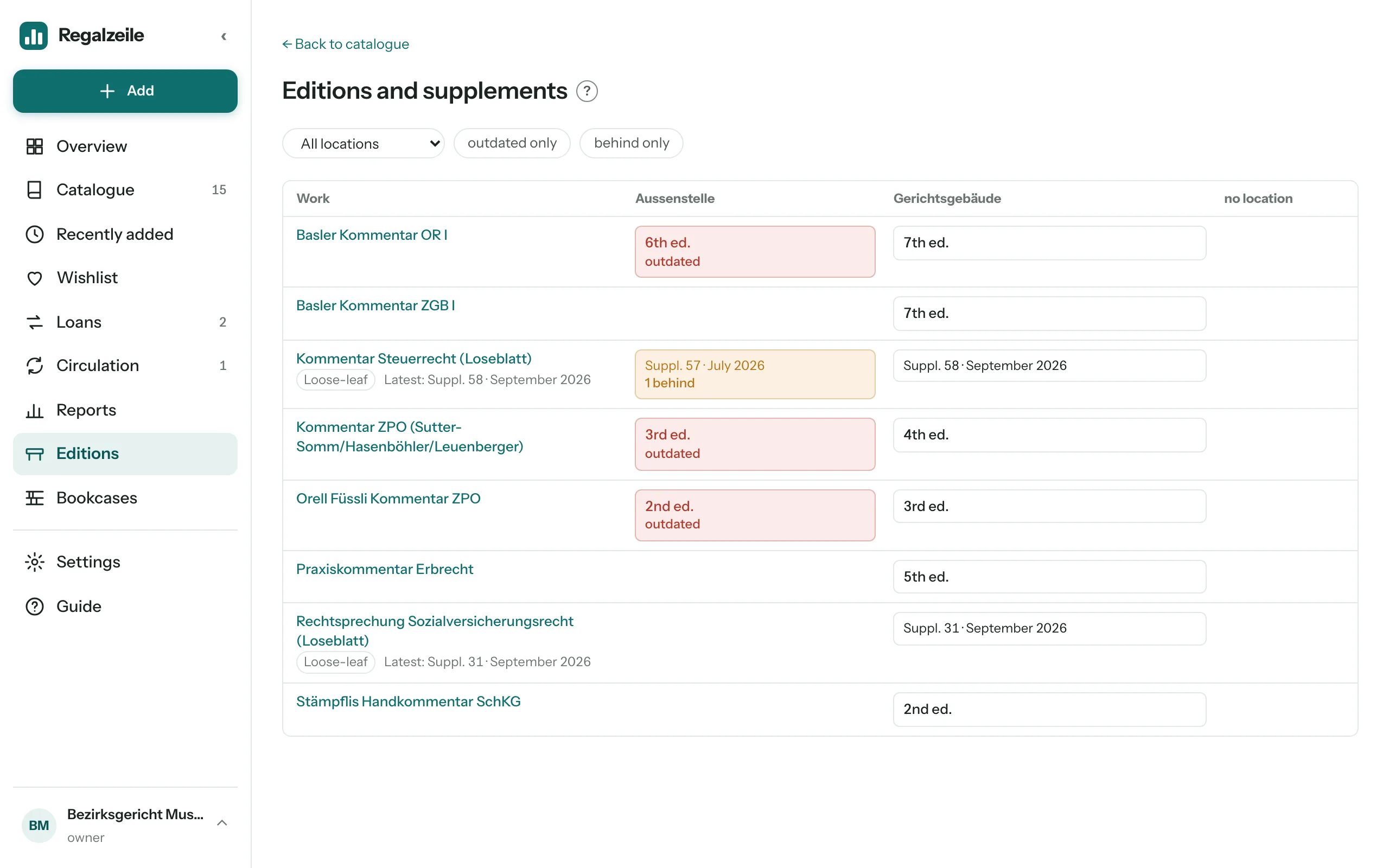
Commentaries and textbooks come out in new editions, loose-leaf works receive supplements all the time — and the same work often stands at several locations. Regalzeile shows you where an older edition is still on the shelf and which copy is falling behind with filing. This is available with every account type.
Edition and work
The form (adding and editing, for books and magazines) has the fields “Edition” and “Work”. Each edition stays an item of its own with its own ISBN; the work holds them together, for example “Basler Kommentar OR I”. As you type, Regalzeile suggests the works in your library, and if an item with the same title already has a work, “Use work: …” appears below the field — one click fills it in. When you add by ISBN, Regalzeile prefills the edition from the German National Library or Open Library; you can change it.
The item page shows the edition next to the year (“7th edition, 2020”), the list in short as “7th ed.” — there only from the second edition on, the first being the norm; if the item has a work, every edition is shown, “1st ed.” included. If the item has a work, the “Other editions” block lists the other items of the same work. An item counts as outdated when your library holds a higher edition of the same work — wherever that one is. Searching for the name of the work finds all its editions at once.
Loose-leaf works
Tick “Loose-leaf work” and two more fields appear: “Binders” (how many binders the work fills, for information only) and “Latest supplement” with number and date — what the publisher delivered last. Each copy is a complete set at one location and has its own supplement status: the number filed last, “Dated”, or both, plus who recorded it and when. If you untick the box again, the statuses are kept and merely hidden.
Location of a copy
In a copy’s dialog you choose under “Building” where it is kept — as soon as your library has a building. When adding an item, the same choice appears for the first copy if the library has at least two buildings. The rule is: placement beats the field. If the copy stands in a bookcase, the building of that bookcase counts, whatever the field says. Putting the copy in a bookcase leaves the field unchanged, and it counts again as soon as the copy has no bookcase spot.
Recording a supplement
You record a supplement status in three places:
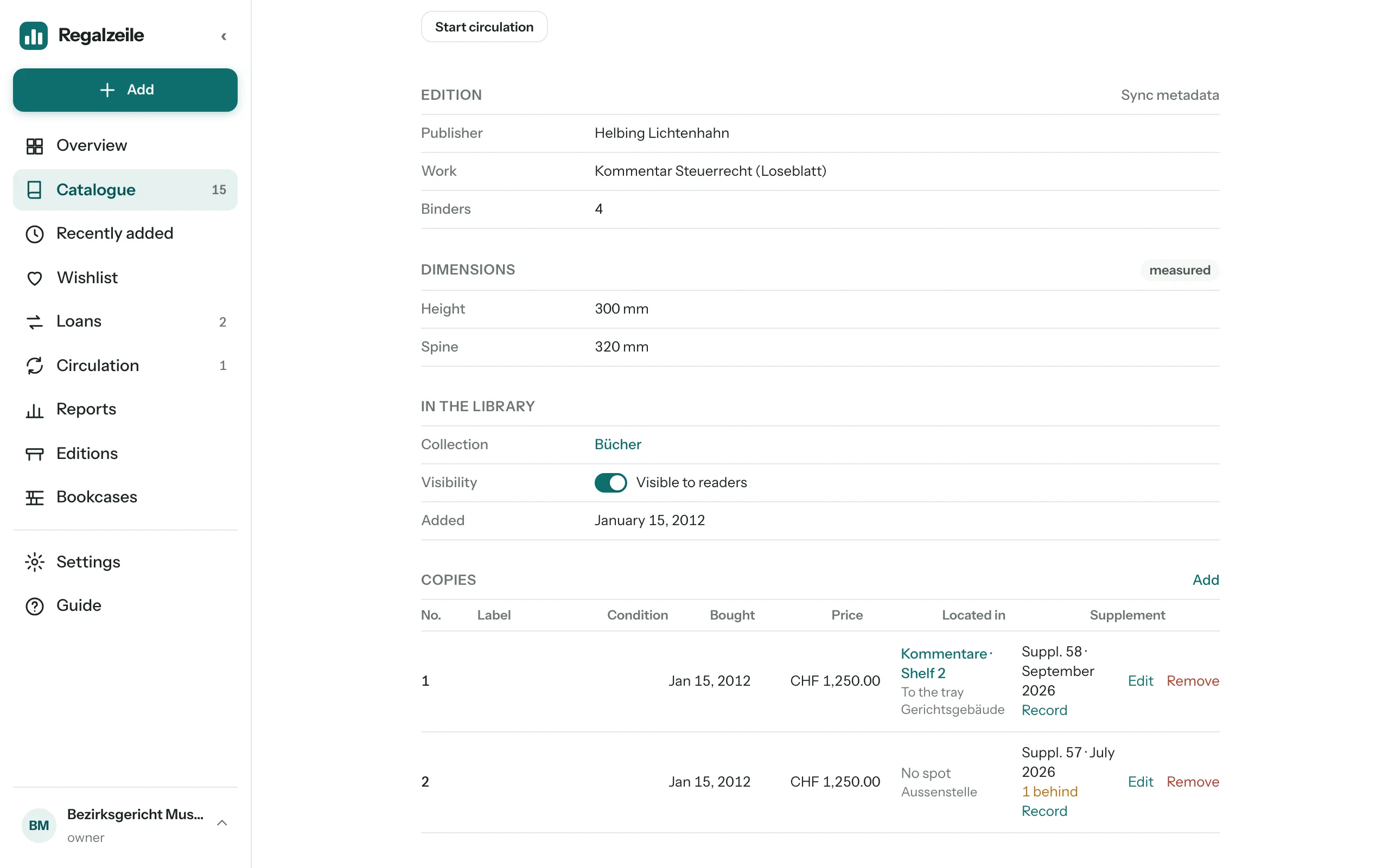 On the item page in the “Copies” block: the “Supplement” column, then “Record” in the copy’s row.
- On the “Editions” page by clicking the cell; if several copies of a loose-leaf work are there, Regalzeile asks “Which copy?” and names number and edition (“Copy 2 · 7th ed.”).
- On the item with “Bring all copies up to date”: number and date of the latest supplement go to every copy.
If you record a higher number on a copy than the item’s latest supplement, Regalzeile raises the latest supplement by itself. The other way round, the latest supplement cannot be set below a copy’s status; you then see the message “Copy 2 is already at supplement 52.”.
The “Editions” page
The “Editions” menu entry under Catalogue opens the overview: one row per work, one column per building, and last “no location” for copies in the tray or without a building. Items from the second edition on but without a work get a row of their own. Each cell shows the highest edition at that location, for loose-leaf works the status below it (“Suppl. 50 · March 2026”), and “×2” when more than one copy is there. With a single building, the overview becomes a simple list.
- Red: an older edition than the highest in your library stands at this location.
- Orange: the copy is behind with its supplements.
- Grey: loose-leaf work without a recorded status — this does not count as behind.
At the top you filter by “Location”, “outdated only” and “behind only”. In the catalogue list and the tray there are also the filters “Loose-leaf” and “Outdated edition”, and on the Overview the “Editions” card counts outdated items and copies that are behind. The export (Settings → “Export data”) contains edition, work, loose-leaf, binders, latest supplement and, per copy, location and status.
Managing works
Under Settings → “Manage authors and publishers” there is a “Works” tab next to authors and publishers. There you rename a work or merge two spellings — as with authors, this applies to every item concerned.